Name the care space
Create one shared care space where everyone helping can find the information they need, whether you call it "Mom's Care Team," "Dad's Recovery Team," or your family's shared care space.
 Start Your Care Space
Caregiving often becomes one person's responsibility by accident. That is a coordination problem, not a personal failure.
When appointments, medications, and decisions live in separate texts, notes, and memory, the mental burden grows fast. Nothing feels stable when everyone helping is coordinating from fragmented information. CareNestHQ™ creates one shared memory for your care team: a calm care space where everyone helping sees the same plan, shares responsibility, and carries less alone.
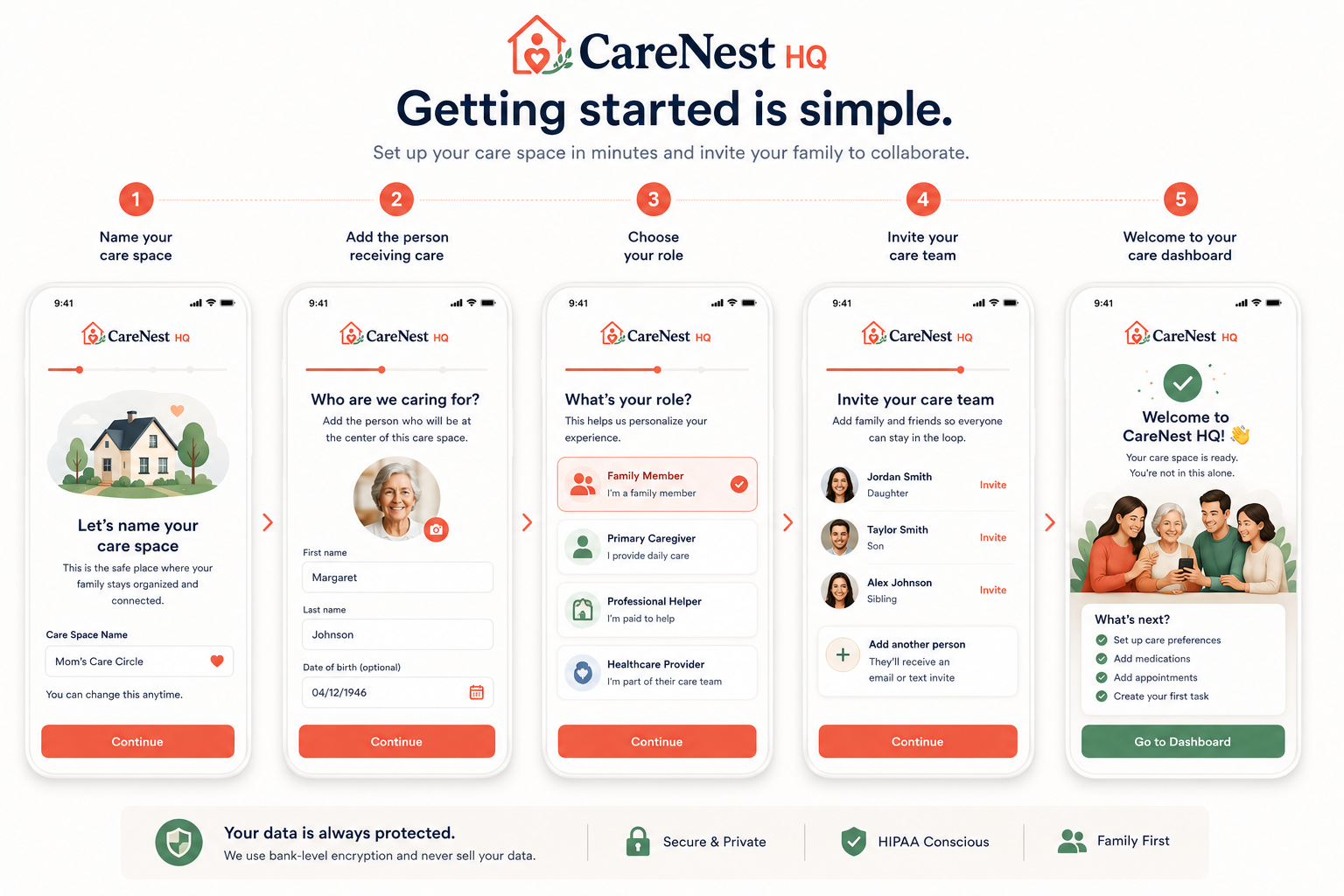
You do not need every answer on day one, and this burden does not have to stay on you forever. These steps build one place where everyone can find what they need, then grow into one shared memory your whole care team can see together.
Create one shared care space where everyone helping can find the information they need, whether you call it "Mom's Care Team," "Dad's Recovery Team," or your family's shared care space.
Connect their medications, appointments, and notes in one shared record so your care team is not piecing together fragmented information after a hospital stay or care transition.
Help siblings and helpers know who you are in the family, so coordination stays clear and you repeat yourself less.
Share responsibility so siblings and trusted helpers carry caregiving with you, not around you.
Understand what needs attention today and what comes next without trying to remember everything yourself.
When one person has been holding everything alone, an invitation is how help finally arrives. Invited helpers do not rebuild the plan from scratch. They accept the invitation, see the same care context, and start helping from the shared view your care team already built, so coordination is shared and no one repeats the same explanations.
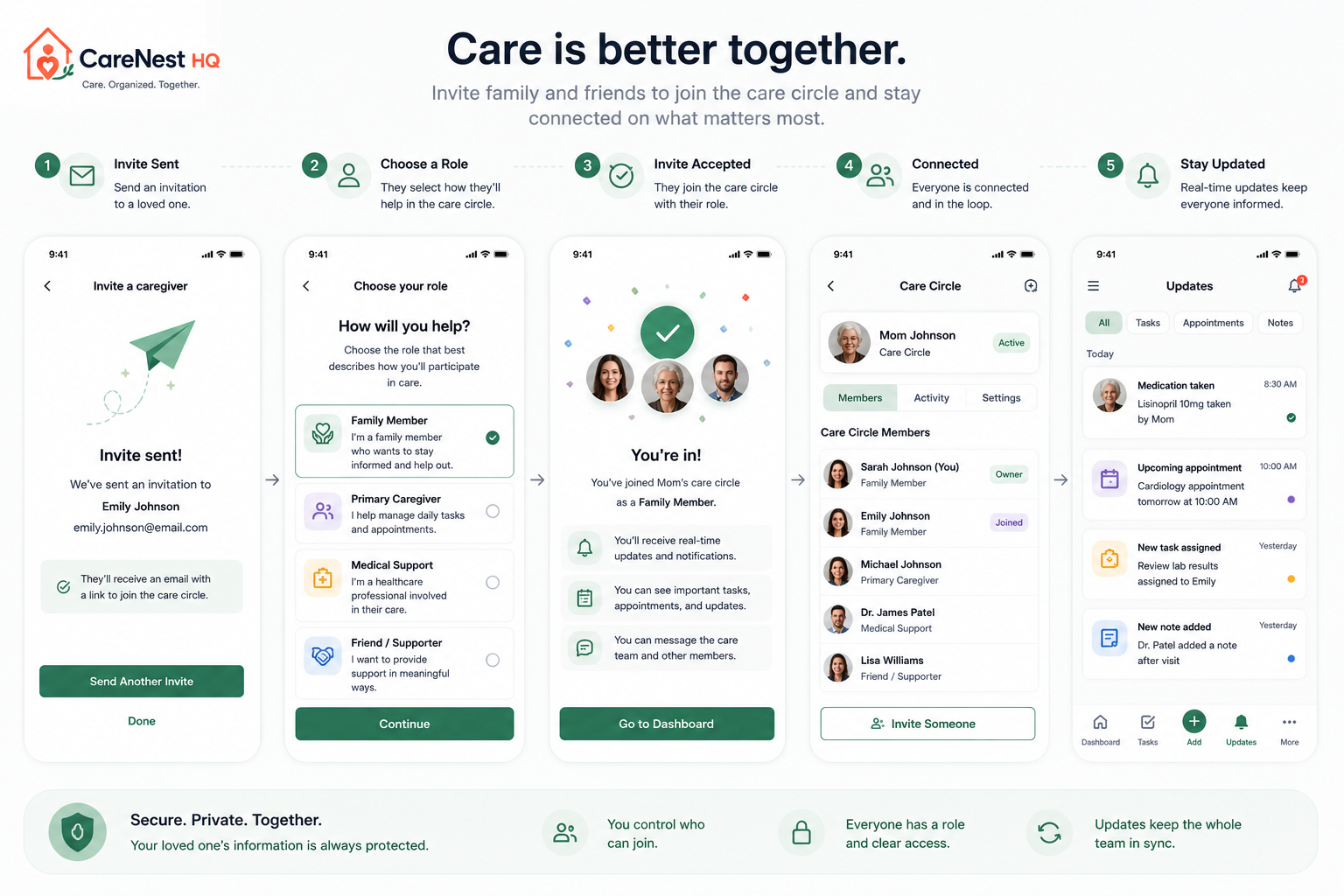
Join the care space already set up and step into shared responsibility instead of starting over alone.
Enter the shared context your care team organized so you can see what needs attention and contribute right away.
Review who is receiving care, what is already organized, and what needs support before you pitch in.
Pick how you fit, such as sibling, helper, or family member, so everyone knows how you can support.
Help everyone understand what needs attention so responsibility is visible and one person is not carrying everything alone.
Help everyone stay informed about medications, especially when lists change after a hospital stay.
Keep appointments visible to everyone helping so your care team prepares together.
Create one place for discharge papers and important information everyone on your care team can find under stress.
Keep everyone informed without repeating yourself every time something changes at home.
Make it easier for people on your care team to help and reach each other without searching through old messages.
Everyone helping sees the same reality: what happened, what needs attention today, what comes next, and what your care team already knows. After a hospital stay or care transition at home, CareNestHQ™ keeps one shared memory so your care team is not reconciling long text chains and scattered notes alone.
Your care team sees what matters today without one person holding every detail in memory.
Upcoming appointments and follow-up visits stay visible so everyone prepares together.
Care updates and documents live in one shared view, so everyone shares the same picture.
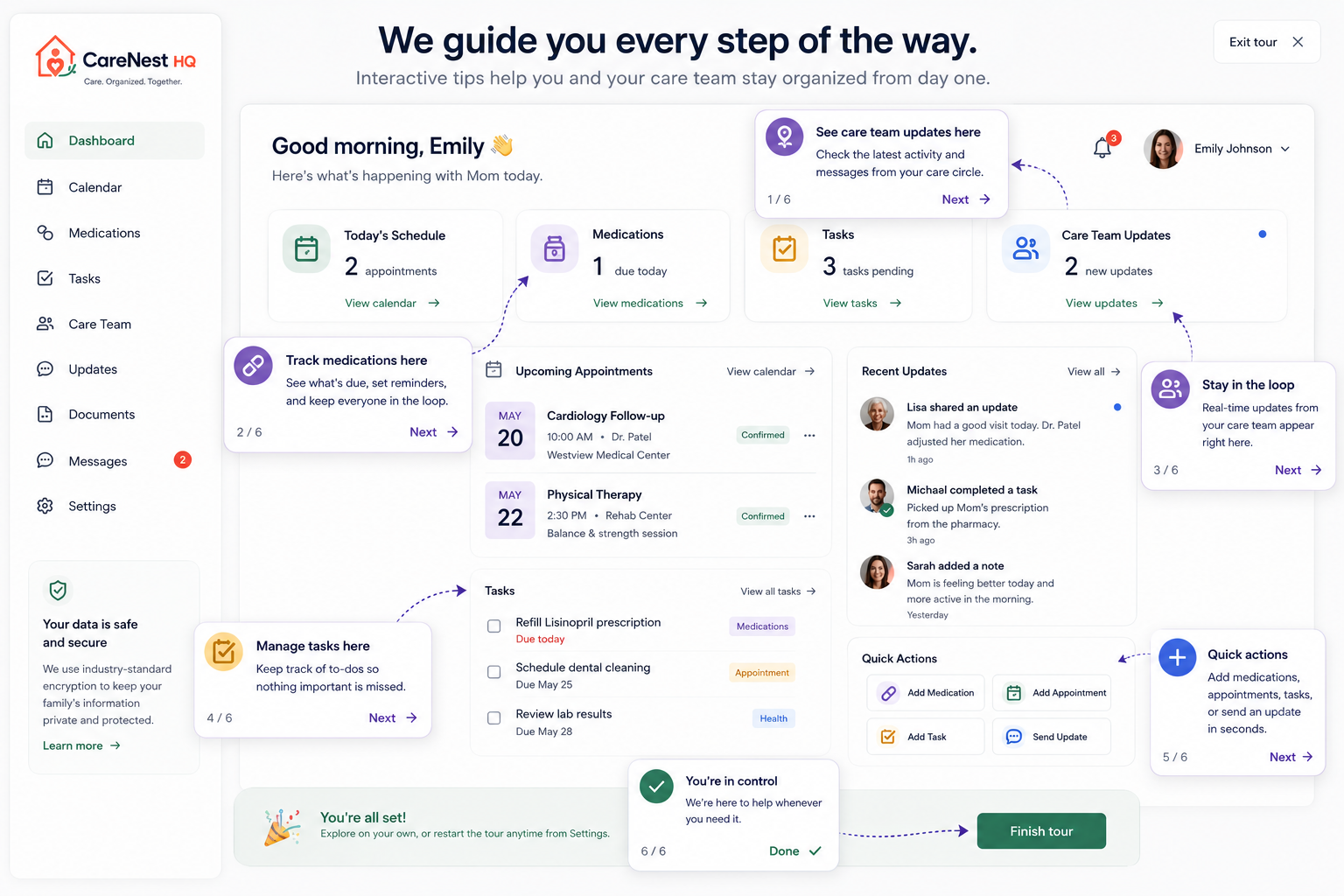
First-time tips show everyone where tasks, medications, appointments, documents, and care updates live, so everyone shares the same picture with less uncertainty. Your care team finally has one place everyone understands, built on one shared memory instead of scattered explanations. Everyone spends less time on uncertainty and more time supporting the person receiving care together.
Start with a name for your care space and the person receiving care. You can invite helpers and add details step by step as you learn what needs attention. You do not need every answer on day one.
Many families start with one coordinator and add helpers over time. A shared care space makes responsibilities visible, so when siblings are ready to participate, they can see what needs attention without you explaining everything again.
Yes. Siblings, helpers, and trusted family can all join the same care space, see the same plan, and share responsibility for tasks, appointments, and updates.
Most families can name the care space, add the person receiving care, and send the first invitations in a few minutes. You can add medications, appointments, and documents as you are ready.
Often the family member coordinating medications, appointments, and updates today. That person can invite siblings and helpers so the plan is no longer held in one memory alone.
Yes. Care spaces are private and secure by default. Only people you invite can see what is inside. You control who has access. Read more in our Privacy Overview.